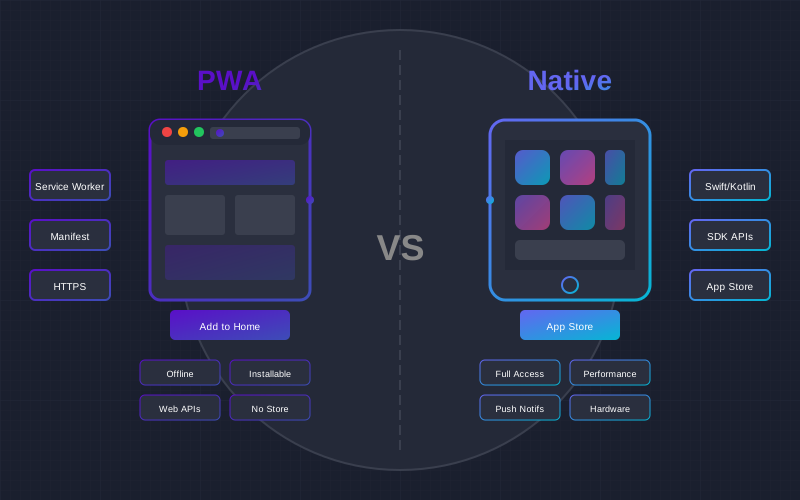
When businesses consider mobile application development, one of the most important questions is the choice of technology. Progressive Web Apps (PWA) have become a serious alternative to traditional native apps in recent years, offering faster development and lower costs. But is PWA suitable for every project? In this article, we will comprehensively compare both technologies and help you make the right decision.
What are PWA and Native Applications?
Progressive Web Apps (PWA) Definition
PWAs are web applications that use modern web technologies (HTML5, CSS3, JavaScript) and provide users with an experience very similar to native apps. PWAs run through a browser but can be "installed" on the device's home screen and function almost as standalone applications.
Key PWA characteristics:
- Progressive - works in all browsers, regardless of their capabilities
- Responsive - adapts to any screen size
- Connectivity independent - can work offline or with slow internet
- App-like - looks and behaves like a native app
- Fresh - always updated due to Service Workers
- Safe - requires HTTPS protocol
- Installable - can be added to the home screen
- Linkable - easily shared via URL
Native Applications Definition
Native applications are developed specifically for one platform (iOS or Android) using the platform's official programming languages and tools. iOS apps are developed with Swift or Objective-C, while Android apps use Kotlin or Java.
Native application characteristics:
- Full hardware access - camera, GPS, Bluetooth, NFC, sensors
- Optimal performance - direct code execution without intermediate layers
- Platform-specific UI - follows iOS Human Interface Guidelines or Material Design
- App Store/Google Play distribution - official channels with built-in monetization
- Deeper OS integration - widgets, Siri/Google Assistant, Shortcuts
Comprehensive Technology Comparison
| Criteria | PWA | Native |
|---|---|---|
| Development cost | 2,900 EUR - 5,000 EUR | 1,500 EUR - 50,000 EUR+ |
| Development time | 2-8 weeks | 2-6 months |
| Platform support | One code for all | Separate for each platform |
| Offline functionality | Yes (Service Workers) | Yes (native) |
| Push notifications | Yes (with iOS limitations) | Full support |
| Hardware access | Limited | Full |
| Performance | Good (90-95% native) | Optimal (100%) |
| Updates | Instant | Via App Store (1-7 days) |
| SEO | Full support | Limited (App Indexing) |
| Installation barrier | Low (no App Store) | Higher (requires download) |
PWA Advantages and Disadvantages
PWA Advantages
1. Cost Effectiveness
PWA development costs on average 40-60% less than separate native apps for iOS and Android. One code serves all platforms, so you save not only on development but also on maintenance costs. PWA prices start from 2,900 EUR for a simple solution.
2. Fast Development and Updates
A PWA can be created in 2-8 weeks, depending on complexity. Updates happen instantly - users don't need to download new versions, as content updates automatically through Service Workers.
3. Universal Accessibility
PWA works on any device with a modern browser - phones, tablets, computers. There's no need to create separate versions for different platforms.
4. SEO Optimization
Since PWA is web technology, it is fully indexed by search engines. This provides organic traffic opportunities that native apps don't have.
5. Low Installation Barrier
Users can start using a PWA directly through the browser without any download. This is especially important for conversions - each additional step reduces the number of potential users by 20-30%.
Statistics: PWA Conversions
According to "Think with Google" data, PWA conversions can be 36% higher than mobile websites and 50% higher than native apps (due to lower installation barrier).
PWA Disadvantages
1. Limited iOS Support
Apple historically limited PWA capabilities on the iOS platform. Although since iOS 16.4 the situation has improved (push notifications added), limitations still exist: limited storage (50MB), no Bluetooth/NFC access, no background execution.
2. Hardware Limitations
PWA cannot access certain device features: Bluetooth, NFC, ARKit/ARCore, advanced camera features, health data (HealthKit/Google Fit).
3. Performance Differences
Although PWA performance is very good (90-95% native), for complex applications with intensive graphics or animations, native still has an advantage.
4. No App Store Presence
PWA is not in the App Store or Google Play, so you lose organic discovery through stores and some monetization opportunities.
Native Application Advantages and Disadvantages
Native Advantages
1. Optimal Performance
Native apps run fastest because code is executed directly without any intermediate layers. This is critical for games, AR/VR apps, video editing.
2. Full Hardware Access
Native apps can use all device capabilities: Bluetooth, NFC, ARKit/ARCore, Face ID/Touch ID, Siri/Google Assistant, Apple Watch/Wear OS integration.
3. App Store Benefits
Being in the App Store and Google Play provides organic discovery, user trust, built-in payment systems, and protection against piracy.
4. Deeper OS Integration
Native apps can create widgets, integrate with Siri/Google Assistant, use Shortcuts, have picture-in-picture mode and other OS-specific features.
Native Disadvantages
1. High Cost
Developing separate iOS and Android apps costs 2-3 times more than PWA. A professional native app costs from 3,000 EUR for one platform, a full solution for both platforms - from 5,000-15,000 EUR.
2. Long Development Time
Native app development takes 2-6 months, compared to 2-8 weeks for PWA.
3. App Store Review Process
Every update must pass App Store review (1-7 days). Fixing critical bugs may take longer than desired.
4. Fragmentation (Android)
The Android ecosystem has thousands of different devices with various screen resolutions and OS versions, which complicates testing.
When to Choose PWA?
PWA is the right choice when:
- Budget is limited - if you have up to 5,000 EUR and want to reach all platforms
- Speed matters - need to quickly launch a product to market (MVP)
- SEO is a priority - want organic traffic through search engines
- Content is key - news portals, e-shops, catalogs
- Frequent updates - content changes daily or weekly
- Low engagement barrier is important - want as many users as possible without download
- No complex hardware features needed - camera, GPS, push notifications are sufficient
PWA Success Stories
- Twitter Lite - 65% increase in pages per session, 75% increase in tweets
- Alibaba - 76% increase in conversions on iOS platform
- Pinterest - 60% increase in engagement, 44% increase in ad revenue
- Starbucks - PWA is 99.84% smaller than iOS app
When to Choose Native?
A native application is a better choice when:
- Complex graphics needed - games, 3D visualization, video editing
- AR/VR functionality - augmented or virtual reality
- Bluetooth/NFC integration - IoT devices, payment terminals
- Health data - HealthKit, Google Fit integration
- Maximum performance is critical - real-time apps, financial programs
- App Store revenue is important - in-app purchases, subscriptions
- Deep OS integration - widgets, Siri, Apple Watch
- Offline-first architecture - lots of data stored locally
Hybrid and Cross-Platform Solutions
Between PWA and fully native, there are middle ground options:
Flutter / React Native
Cross-platform frameworks allow writing one code and compiling it into native apps for both platforms. This provides better performance than PWA and greater hardware access, but with a single codebase.
Capacitor / Cordova
These tools allow "packaging" a web application into a native container and publishing to App Store/Google Play. This is a great compromise when you need App Store presence but don't have time for native development.
Prices in 2025
| Solution Type | Price from | Development Time |
|---|---|---|
| Simple PWA | 2,900 EUR | 2-4 weeks |
| E-commerce PWA | 649 EUR | 4-8 weeks |
| Complex PWA | 1,500 EUR+ | 2-3 months |
| Cross-platform (Flutter/RN) | 7,900 EUR | 1-3 months |
| Native Android | 4,900 EUR | 1-3 months |
| Native iOS + Android | 5,000 EUR+ | 3-6 months |
Decision Making Questionnaire
Answer these questions to determine the best choice:
- Do you need Bluetooth, NFC or AR functionality? Yes = Native/Cross-platform
- Is the budget over 5,000 EUR? Yes = You can choose Native
- Is SEO a priority? Yes = PWA
- Do you need App Store presence? Yes = Native or PWA with Capacitor
- Does the product need to be on market within 2 months? Yes = PWA
- Is 95% performance sufficient? Yes = PWA, No = Native
Frequently Asked Questions (FAQ)
Conclusions
PWA and Native applications have their places in the ecosystem. PWA is excellent for content platforms, e-shops, news portals, and business applications where speed, cost effectiveness, and universal accessibility are important. Native remains the best choice for complex applications with specific hardware requirements.
For most businesses, PWA is the optimal initial choice - lower investment, faster time to market, and the ability to later transition to a native solution if needed. It's important to evaluate your goals, budget, and technical requirements before making a final decision.
Not sure which technology to choose?
Contact us for a free consultation and get a professional assessment of which technology best fits your business needs.
Get Free Consultation