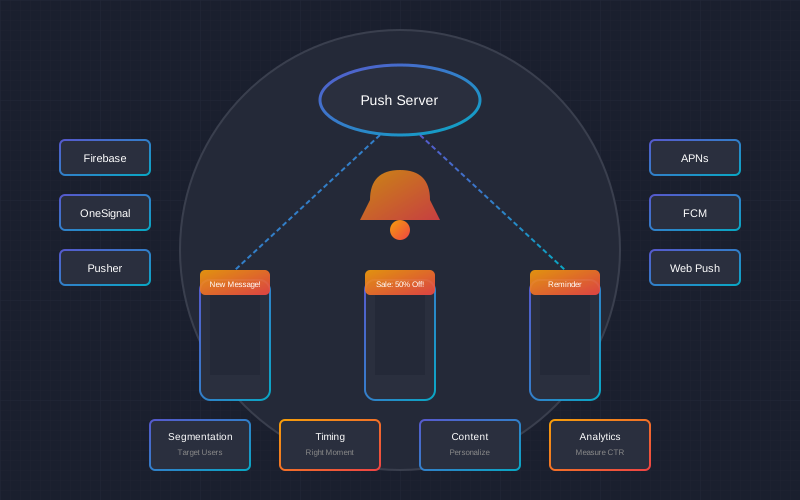
Push notifications are one of the most powerful tools in the mobile application arsenal. When used properly, they can increase user retention by up to 88%, improve conversions 3-4 times, and create a direct connection with customers. However, poorly implemented push notifications become annoying spam, leading to app uninstalls. In this comprehensive guide, we'll discuss how to create an effective push notification strategy.
The Power of Push Notifications in Numbers
Unlike email or social media, push notifications reach the user directly on their phone - even when the app is closed. This creates a unique opportunity to communicate in real-time and encourage immediate action.
Types of Push Notifications and Their Use
1. Transactional Notifications
These notifications inform about user-initiated actions and have the highest open rate (up to 80%):
- Order confirmation - immediately after purchase
- Shipping updates - dispatch, delivery
- Payment confirmation - successful payment
- Account security - login, password change
2. Marketing Notifications
These drive sales and engagement but require a more careful approach:
- Promotions and discounts - limited time offers
- New products - based on user interests
- Seasonal campaigns - holidays, Black Friday
- Loyalty programs - points, special offers
3. Behavioral Notifications
These respond to user actions in the app:
- Abandoned cart - 70% of carts are abandoned before purchase completion
- Price drop - for wishlist products
- Back in stock - product available again
- Viewed products - reminder about interest
4. Engagement Notifications
These encourage regular app usage:
- Reminder - for inactive users
- Achievements - gamification elements
- News - relevant content
- Personalized recommendations - based on history
Optimal Sending Time
Research shows that notification timing can affect open rates by up to 40%. Here are recommended times:
| Time | Audience | Notification Type | CTR |
|---|---|---|---|
| 8:00 - 10:00 AM | Everyone | Daily news, reminders | 6-8% |
| 12:00 - 2:00 PM | Workers | E-commerce, food | 8-12% |
| 5:00 - 7:00 PM | Everyone | Entertainment, promotions | 10-15% |
| 8:00 - 9:00 PM | Users at home | E-commerce, content | 12-18% |
| Sunday 6:00-8:00 PM | E-commerce | Weekly promotions | 15-20% |
Pro tip: Timezone Management
Use "Intelligent Delivery" features (Firebase, OneSignal), which automatically send notifications at the optimal time for each user, analyzing their previous behavior and activity times.
Personalization: The Key to High CTR
Personalized notifications achieve 4x higher CTR than generic ones. Here are the levels of personalization:
1. Basic Personalization
- Name - "Hi, John! We have an offer for you"
- Location - "Free delivery to New York today!"
- Language - English/local language based on settings
2. Behavioral Personalization
- Purchase history - "Your favorite Nike Air Max is back in stock!"
- Browsing history - "Discount on products you viewed"
- Categories - recommended products based on interests
3. Advanced Personalization (AI)
- Predicted behavior - likely conversion
- Optimal time - individual sending time
- Content recommendations - ML-based
Segmentation: Targeted Audience
Effective segmentation allows sending the right message to the right people. Main segmentation criteria:
| Segment | Criteria | Notification Strategy |
|---|---|---|
| New users | Registered within 7 days | Onboarding, first purchase discount |
| Active buyers | Purchase within 30 days | New products, loyalty offers |
| At-risk group | Inactive 30-60 days | Re-engagement, special discounts |
| Churning | Inactive 60+ days | Aggressive offers, "we miss you" |
| VIP customers | High purchase value | Exclusive offers, priority |
| Cart abandoners | Incomplete purchase | Reminder, completion discount |
A/B Testing: Continuous Improvement
A/B testing is essential for optimizing push notification effectiveness. What to test:
Elements to Test
- Headline - questions vs statements, emoji vs no emoji
- Message length - short (30 chars) vs long (90 chars)
- CTA - "Buy now" vs "Learn more"
- Time - different sending times
- Urgency elements - "Today only" vs "Limited offer"
- Personalization - with name vs without name
A/B Testing Example
Variant A: "Flash Sale! -50% on everything"
Variant B: "John, your favorite products -50% for only 3 hours!"
Result: Variant B achieved 2.3x higher CTR due to personalization and urgency element.
Testing Best Practices
- Test only one element at a time
- Use at least 1,000 users per group
- Wait for statistical significance (95%+)
- Document results and apply findings
GDPR Compliance: What You Need to Know
Important: GDPR Requirements
Push notifications must comply with GDPR. Fines for violations can reach up to 20 million EUR or 4% of annual turnover.
Mandatory Requirements
- Clear consent (Opt-in)
- User must actively agree to receive notifications
- Cannot use pre-checked boxes
- Must explain what notifications they will receive
- Easy opt-out
- One-button opt-out option
- Settings in the app
- Granular control option (e.g., opt-out of marketing only)
- Data security
- Don't put personal data in notification text (visible on lock screen)
- Encrypt transmitted data
- Keep consent records
GDPR-Compliant Opt-in Strategy
We recommend a "two-step" consent process:
- Soft-ask - explain the benefits of notifications within the app
- System dialog - only then show the official permission request
This strategy increases consent rates from 40% to 70%.
Key Metrics and KPIs
| Metric | Description | Good Rate | Excellent Rate |
|---|---|---|---|
| Opt-in Rate | % who agreed to notifications | 40-50% | 60%+ |
| Delivery Rate | % successfully delivered | 95%+ | 98%+ |
| Open Rate (CTR) | % of opened notifications | 5-10% | 15%+ |
| Conversion Rate | Conversion from opened | 1-3% | 5%+ |
| Opt-out Rate | % opted out per month | <5% | <2% |
| Uninstall Rate | Uninstalls after notification | <2% | <0.5% |
Tools and Platforms
Firebase Cloud Messaging (FCM)
Google's free platform, suitable for most projects:
- Price: Free
- Pros: Reliability, integration with Firebase ecosystem, analytics
- Cons: Limited segmentation options, basic A/B testing
- Best for: Startups, small/medium projects
OneSignal
Most popular third-party push platform:
- Price: Free up to 10,000 subscribers, from $9/month
- Pros: Advanced segmentation, A/B testing, in-app messages
- Cons: Advanced features are paid
- Best for: Medium and large projects
Airship (formerly Urban Airship)
Enterprise-level solution:
- Price: From $100/month
- Pros: Full functionality, ML personalization, premium support
- Cons: High price
- Best for: Large enterprises, e-commerce leaders
Tool Comparison
| Feature | Firebase | OneSignal | Airship |
|---|---|---|---|
| Starting price | Free | Free | ~$100/month |
| Segmentation | Basic | Advanced | Enterprise |
| A/B Testing | Yes (limited) | Yes | Yes (advanced) |
| Personalization | Basic | Good | ML-based |
| Analytics | With Firebase Analytics | Integrated | Advanced |
| Integration | Easy | Easy | Medium |
Pricing Overview
Push notification system implementation and management prices:
| Service | Price | What's Included |
|---|---|---|
| Basic integration | 200-500 EUR | FCM/OneSignal setup, basic notifications |
| Medium integration | 500-1,500 EUR | + Segmentation, A/B testing, analytics |
| Full system | 1,500-4,000 EUR | + Automation, personalization, GDPR |
| Enterprise | 4,000+ EUR | Custom solution, ML, full integration |
ROI Example
E-commerce app with 50,000 users:
Investment: 1,000 EUR (integration) + 50 EUR/month (OneSignal)
Result: +15% conversions, +25% retention
Additional revenue: ~3,000-5,000 EUR/month
Payback: <1 month
Common Mistakes to Avoid
Avoid These Mistakes
- Sending too frequently - more than 2 notifications per day increases uninstalls by 50%
- Wrong timing - notifications sent at night are annoying
- Generic messages - "Hello everyone!" doesn't work
- Misleading headlines - clickbait reduces trust
- Ignoring opt-out - GDPR violation
- Not testing - decisions without data
Frequently Asked Questions (FAQ)
Conclusion
Push notifications are an integral part of a successful mobile application. A properly implemented strategy can increase user retention by up to 88%, improve conversions 3-4 times, and create a strong connection with customers.
Key success factors:
- Personalization - segment your audience and tailor messages
- Right timing - send when users are active
- Value for user - every notification should be useful
- A/B testing - continuously improve your strategy
- GDPR compliance - ensure legal safety
- Measurement - track KPIs and respond to changes
Start with Firebase Cloud Messaging if you're building a new project, or OneSignal if you need more advanced features. Most importantly - start and continuously improve your strategy based on collected data.
Want to implement an effective push notification system?
Contact us for a free consultation and get a personalized proposal tailored to your application's needs.
Get a free consultation